Practical Project Control Course for Planning Engineers
Master the project control foundations, develop a cost and resource-loaded baseline, update the schedule and prepare progress reports in ONE course.

We trained planning engineers of leading companies

From contract documents to the monthly progress report.
Everything a planning engineer does on a construction project, taught in the order you will do it on site.
- 01
Learn basic and advanced Primavera P6
- 02
Understand the contract requirements and scope
- 03
Develop a cost and resource-loaded baseline schedule
- 04
Create resource histograms and cash flow
- 05
Monitor progress with various project management indicators
- 06
Prepare weekly and monthly progress reports
- 07
Learn advanced Excel in a project control context
- 08
Create a project control system and protocol for your company
Built for engineers new to project control.
Most P6 courses teach buttons. This one teaches the job.
- 01
Learn the process integration
Learn the planning foundations, prepare a cost and resource-loaded schedule, update the schedule, analyze the progress and prepare full reports in ONE course.
- 02
Master the process, not the software
A step-by-step learning program that focuses on the problem you are trying to solve: how to plan and control projects, not just how to use a Primavera tool.
- 03
Practical content only
The program is 100% practical. You will learn the tools and methods used to manage real-life projects.
- 04
Develop the mindset
A fully integrated program that teaches you how to think and act as a planner.
- 05
Learn the software in context
The program teaches you how to use Excel and PowerPoint in a project control context.
- 06
Career growth
Gain the knowledge and results that help you add value to the project.
Real project outputs, not exercises.
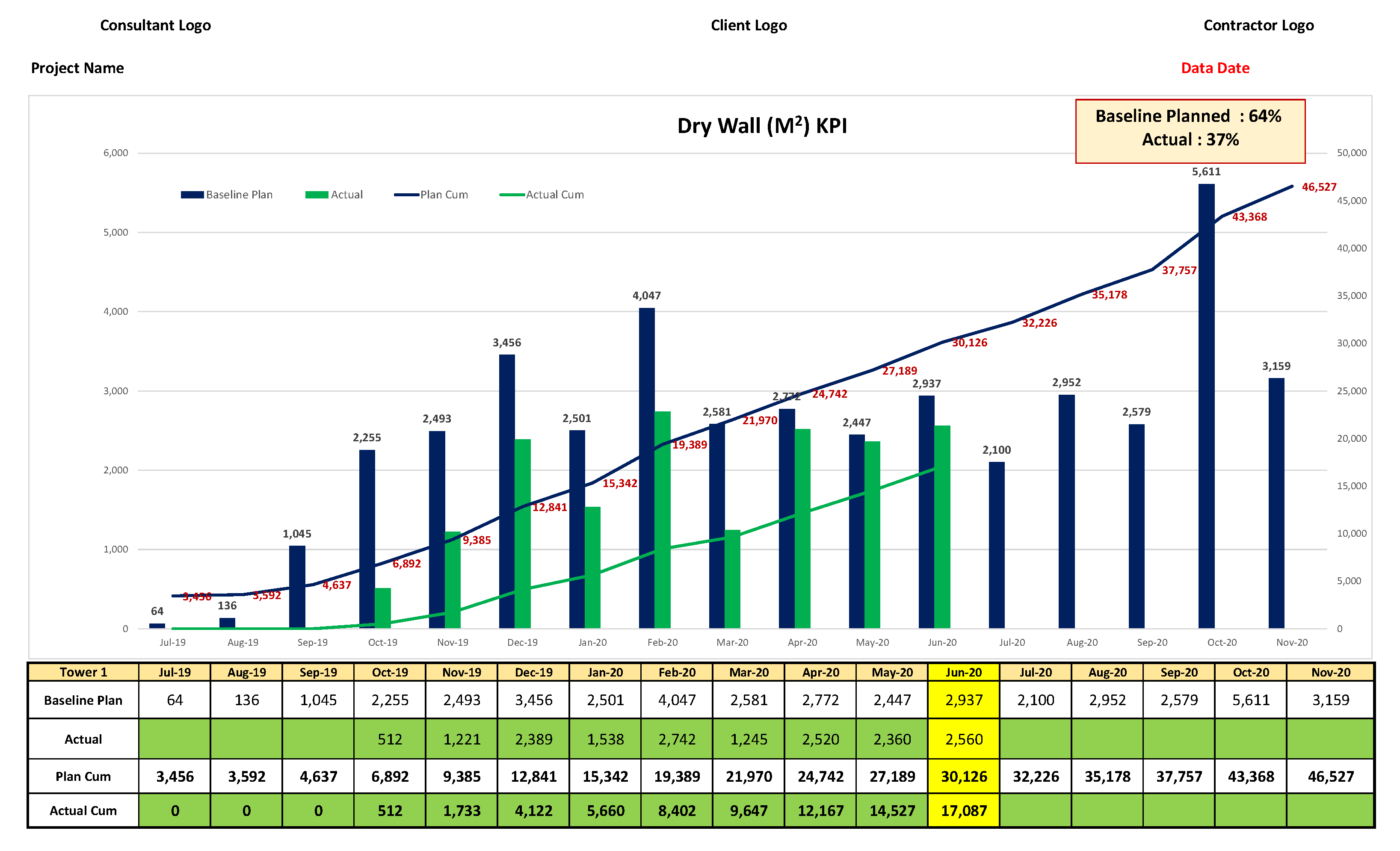
By the end of the course you will be able to prepare outputs like these: full weekly and monthly progress reports, progress S-curves, cash flow and KPIs. Select an image to view it full size.


10 modules. 60 practical topics.
Follow the planner’s workflow from contract requirements to the baseline, the schedule update and the progress report. Select a module to see its topics.
Everything included, itemised like a bill of quantities.
| Item | Description | Unit |
|---|---|---|
| 1.01 | Basic and advanced Primavera P6Advanced functions and shortcuts to increase productivity and the accuracy of your results | included |
| 1.02 | Advanced Excel in project controlConditional formatting, VLOOKUP, INDEX & MATCH and much more in a planning context | included |
| 1.03 | Baseline preparationStep-by-step development of a complete cost and resource-loaded baseline programme from scratch inside P6 | included |
| 1.04 | Progress reportingAnalyze performance and prepare comprehensive progress reports | included |
| 1.05 | PowerPoint for project controlKey features of PowerPoint to make high-quality presentations | included |
| 1.06 | Bonus: templates, formats and toolsDetailed editable formats that will save you a lot of time and effort | 1 set |
| 1.07 | Lifetime accessWatch the recorded tutorials at your own pace, as often as you need | included |
| 1.08 | Certificate of completionDownload instantly when you finish, showing the total training hours | 1 No. |
| TOTAL | Course fee | USD 400 |
What planning engineers say about this course
“It was a really interesting training that fully met my expectations in the advanced levels of project control tools. Osama delivered the course with professionalism, wide knowledge, and expertise. The course was one of the best training I have ever attended, as it was clear, precise, and very practical. Thanks Osama and Smart PM Training for giving me the chance to attend the course.”

“The program is well structured for the practical construction field and covers all practical knowledge with detailed explanation of P6 and also the usage of Advanced Excel Functions in the Planning and Project Control Industry.”

“The program has a dense content “although it was enjoyable” and new information was presented in a practical way. The training was great to add to my skills as an Engineer. Thanks Osama for sharing your brilliant experience with me.”


Osama Saad
Project Control Consultant and founder of Novycore
Osama is a Project Control Consultant with experience in the project control field since 2010 across the UAE and other countries. He has worked on super-large construction projects and specializes in project control, Power BI, delay analysis, and EOT claims.
He is the founder of Novycore, a platform focused on digitizing and transforming construction site operations into structured, reliable data that supports analytics and future AI-driven insights.
Start today. Learn at your own pace.
Get instant access to every module, the templates and the tools, and keep them for life.
- Self-paced recorded program, start immediately
- Lifetime access to all recorded tutorials
- Editable templates, formats and tools
- Certificate of completion with training hours
Due to the digital nature of the course delivery, all payments are non-refundable.